- An array must be declared with type of variable or data type
- An array contains same type of data
e.g. – int a [10] - The name of array cannot be same as that of any other variable within the function.
- The size of array is specified using sub-script notation (index)
- THE sub-script indicates that how many elements are to be allocated to an array.
- A sub-script used to declare an array is called dimension
DECLARE ARRAYS
ARRAYS
Arrays are widely used data type in ‘C’ language. It is a collection of elements of similar data type. These similar elements could be of all integers, all floats or all characters. An array of character is called as string whereas and array of integer or float is simply called as an array. So array may be defined as a group of elements that share a common name and that are defined by position or index. The elements of an arrays are store in sequential order in memory.
WAP to input your name and display it
#include
void main ( )
{
char nm [15];
clrscr ( );
printf (“enter your name”);
gets (nm);
printf (“name is %s”,name);
getch ( );
}
STRING
String are the combination of number of characters these are used to store any word in any variable of constant. A string is an array of character. It is internally represented in system by using ASCII value. Every single character can have its own ASCII value in the system. A character string is stored in one array of character type.
e.g. “Ram” contains ASCII value per location, when we are using strings and then these strings are always terminated by character ‘\0’. We use conversion specifier %s to set any string we can have any string as follows:-
char nm [25]
When we store any value in nm variable then it can hold only 24 character because at the end of the string one character is consumed automatically by ‘\0’.
1. strlen - string length
2. strcpy - string copy
3. strcmp - string compare
4. strups - string upper
5. strlwr - string lower
6. strcat - string concatenate
7. strstr - string string
JUMPS STATEMENTS
These are also called as branching statements. These statements transfer control to another part of the program. When we want to break any loop condition or to continue any loop with skipping any values then we use these statements. There are three types of jumps statements.
1. Continue
2. Break
3. Goto
Continue
This statement is used within the body of the loop. The continue statement moves control in the beginning of the loop means to say that is used to skip any particular output.
Example:
WAP to print series from 1 to 10 and skip only 5 and 7.
#include
void main ( )
{
int a;
clrscr ( );
for (a=1; a<=10; a++)
{
if (a= =5 | | a= = 7)
continue;
printf (“%d \n”,a);
}
getch ( );
}
Break
This statement is used to terminate any sequence or sequence of statement in switch statement. This statement enforce indicate termination. In a loop when a break statement is in computer the loop is terminated and a cursor moves to the next statement or block;
Example:
WAP to print series from 1 to 10 and break on 5
#include
void main ( )
{
int a;
clrscr ( );
for (a=1; a<=10; a++)
{
if (a= =5)
break;
printf (“%d \n”,a);
}
getch ( );
}
Goto statement
It is used to alter or modify the normal sequence of program execution by transferring the control to some other parts of the program. the control may be move or transferred to any part of the program when we use goto statement we have to use a label.
WAP TO FIND IF NUMBER=10
#include
void main ()
{
int a;
clrscr ();
printf ("Enter any Number: ");
scanf ("%d",&a);
if (a= =10)
goto g;
else
goto b;
g:
printf ("Good");
goto end;
b:
printf ("Bad");
goto end;
end:
getch ();
}
WAP TO PRINT SERIES
#include
void main ()
{
int a;
clrscr ();
a=1;
check:
if (a< =10)
goto inc;
else
goto end;
inc:
printf (“%d \n”,a);
goto check;
end:
getch ( );
}
NESTED LOOP
These loops are the loops which contain another looping statement in a single loop. These types of loops are used to create matrix. Any loop can contain a number of loop statements in itself. If we are using loop within loop that is called nested loop. In this the outer loop is used for counting rows and the internal loop is used for counting columns
SYNTAX:-
for (initializing ; test condition ; increment / decrement)
{
statement;
for (initializing ; test condition ; increment / decrement)
{
body of inner loop;
}
statement;
}
PROGRAM
#include
void main ( )
{
int i, j;
clrscr ( );
for (j=1; j<=4; j++)
{
for (i=1; i<=5; i++)
{
printf (“*”)
}
printf (“\n”);
}
getch ( );
}
OUTPUT OF THIS PROGRAM IS
* * * *
* * * *
* * * *
* * * *
LOOPING
These statements are used to control the flow of the program and repeat any process multiple times according to user’s requirement. We can have three types of looping control statements.
1. While
2. Do-while
3. For
While
It is an entry control loop statement, because it checks the condition first and then if the condition is true the statements given in while loop will be executed.
SYNTAX:-
Initialization;
while (condition)
{
Statements;
Incremental / decrement;
}
Do-while
Do-while loop is also called exit control loop. It is different from while loop because in this loop the portion of the loop is executed minimum once and then at the end of the loop the condition is being checked and if the value of any given condition is true or false the structure of the loop is executed and the condition is checked after the completion of true body part of the loop.
SYNTAX:-
Initialization
do
{
Statement;
Increment / decrement;
}
while (condition)
For loop
It is another looping statement or construct used to repeat any process according to user requirement but it is different from while and do-while loop because in this loop all the three steps of constructions of a loop are contained in single statement. It is also an entry control loop. We can have three syntaxes to create for loop:-
for (initialization;
Test condition; Increment / decrement)
{
Statement;
}
for (; test condition; increment / decrement)
{
Statement;
}
for (; test condition;)
{
Statement;
Increment / decrement
}
#include
void main ( )
int a;
clrscr ( );
for (a=1; a<=10; a++)
{
printf (“%d \n”,a);
}
getch ( );
}
SWITCH CASE / SELECT CASE
These statements are used with the replacement of if-else and these statements are used when we have multiple options or choices. These choices can be limited and when we use switch case we can use only integer or character variable as expression.
#include <stdio.h>
void main()
{
int,ch qty;
long tb,dis,nb;
clrscr();
printf("1.BPL\n2.Onida\n3.Sony\n4.Samsung\n5.LG\n");
printf("\nEnter Your Choice: ");
fflush(stdin);
scanf("%d",&ch);
printf("Enter Qty: ");
scanf("%d",&qty);
switch(ch)
{
case 1:tb=(long)qty*10000;
printf("\nBPL is %ld",tb);
break;
case 2:tb=(long)qty*12000;
printf("\nOnida is %ld",tb);
break;
case 3:tb=(long)qty*11500;
printf("\nSony is %ld ",tb);
break;
case 4:tb=(long)qty*11000;
printf("\nSamsung is %ld ",tb);
break;
case 5:tb=(long)qty*13000;
printf("\nLG is %ld ",tb);
break;
default:
printf("Wrong Choice...");
}
dis=(tb*10)/100;
nb=tb-dis;
printf("\nDiscount is %ld",dis);
printf("\nNet bill is %ld",nb);
getch();
}
NESTED IF
If within if is called nested if and it is used when we have multiple conditions to check and when any if condition contains another if statement then that is called ‘nested if’.
If the external condition is true, then the internal if condition or condition are executed and if the condition is false then the else portion is executed of the external if statement
SYTAX
if (condition)
{
…….
…….
}
if (condition)
{
…….
…….
}
else if (condition)
{
…….
…….
}
else if (condition)
{
…….
…….
}
else
{
…….
……. }
}
else
{
…….
…….
}
CONTROL STATEMENTS
These statements are used to control the flow of program by using these statements. We can jump from one statement to another statement in C language. We can have four types of control statements:-
- decision making
- case control statement or switch statement
- looping / iteration statement
- jump / branching statement
Decision making
These statements are used when we want to take any decision according to the condition or user requirement. These statements work on a particular condition. These conditions are used by using ‘if’ statement. We can have four types of conditional statements
- if
- if-else
- if – else if
- nested if
if
if statement is simple decision making statement, which is used to take any decision when the condition is true.
if (statement)
{
Statement;
}
if (expression / condition)
Statement;
If-else
This statement is used to make decision in C language. If the given condition is true then the cursor will move to the true portion else it will move to the false portion.
if (condition)
{
Statement;
}
else
{
Statement;
}
If else-if
This is another control statement which is used to take any decision according to the given condition. If the condition is true then the cursor will move to the true portion and if the condition is false the cursor will move to the false or else-if portion and then checks another condition. If this condition is true then it will move and run the second true portion and if the condition is false then cursor will move the next portion of if condition which is another else-if or else portion.
if (condition)
{
Statement;
}
else if (condition)
{
Statement;
}
else if (condition)
{
Statement;
}
else
{
Statement;
}
OPERATORS
Every language contains variable and data types and also support the concept of operators. C language has over forty operators, but hardly all they are used. These are divided onto nine categories:-


(1) Arithmetic
(2) Assignment
(3) Logical
(4) Relational
(5) Modulas
(6) Increment / Decrement
(7) Conditional
(8) Bit wise
(9) Special
Arithmetic Operators (+ - * /)
These are the common operators used to perform any arithmetic calculations. These are basically used on minimum two variables or constants. These operators contain +, -, *, /.
Assignment Operators
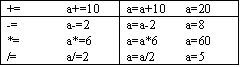
These operators are used to assign any value to the variable or constant. The main assignment operator is ‘=’.
We have some short assignment operators. Suppose a=10

Logical operators
These are used to test more than one condition or we can say conditional expression, so that you can make a decision on the basis of that condition. These operators are

Relational operators
These operators are also called comparison operators. You can use relational operators, whenever you want to compare two quantities and variables or constants and you want to take decision on the basis of that condition. Then these operators are used.
We have following types of operators:-
>
<
>=
<=
==
!=
Modulas Operator
This operator is used to find out the reminder of any value.
R=25%10 R=5
Increment / Decrement operators
These operators are also called unary operators. These operators are used when we want to perform any action on single operand. These operators are used when we want to increase or decrease value of any variable by one.
Increment operator is ++
Decrement operator is –
We have two types of unary operators
Post fix
This operator is used to assign any value of variable to another variable according to use requirement. In this operator firstly the value of a variable is copied to another variable and then the value is increased or decreased.
a=10
a++ a=11
Pre-fix
This operator is used to assign value to any variable according to user requirement, so that the same value is copied to another variable. Firstly the value of variable is increased or decreased and then it is copied to any other variable.
a=10
++a a=11
Conditional operators
These operators are also called ternary operators. These are used to check any condition or expression and can be used to compare two conditional expressions and produce a result if the condition is true or false. Operators used for conditional operators are “?” and “:”
Syntax:-
(expression / condition)? True statement (if) : false statement (else)
Bit wise operators
C is known as assembly language because it provides us bit wise operators, which are normally associated with assembly language programming. C language has a powerful set of special operators which are capable of manipulating data at bit level. These are as follows:-
1) & - Bit wise (and)
2) ! - Bit wise (or)
3) ^ - Bit wise (exponent)
4) << - Shift left
5) >> - Shift right
Special operators
Special operators are provided by C. these operators are as follows:-
- commas operators (,)
- pointer operators (*, &)
- sizeof ( )
Relational operators
These operators are also called comparison operators. You can use relational operators, whenever you want to compare two quantities and variables or constants and you want to take decision on the basis of that condition. Then these operators are used.
We have following types of operators:-
>
<
>=
<=
==
!=
Modulas Operator
This operator is used to find out the reminder of any value.
R=25%10 R=5
Increment / Decrement operators
These operators are also called unary operators. These operators are used when we want to perform any action on single operand. These operators are used when we want to increase or decrease value of any variable by one.
Increment operator is ++
Decrement operator is –
We have two types of unary operators
Post fix
This operator is used to assign any value of variable to another variable according to use requirement. In this operator firstly the value of a variable is copied to another variable and then the value is increased or decreased.
a=10
a++ a=11
Pre-fix
This operator is used to assign value to any variable according to user requirement, so that the same value is copied to another variable. Firstly the value of variable is increased or decreased and then it is copied to any other variable.
a=10
++a a=11
Conditional operators
These operators are also called ternary operators. These are used to check any condition or expression and can be used to compare two conditional expressions and produce a result if the condition is true or false. Operators used for conditional operators are “?” and “:”
Syntax:-
(expression / condition)? True statement (if) : false statement (else)
Bit wise operators
C is known as assembly language because it provides us bit wise operators, which are normally associated with assembly language programming. C language has a powerful set of special operators which are capable of manipulating data at bit level. These are as follows:-
1) & - Bit wise (and)
2) ! - Bit wise (or)
3) ^ - Bit wise (exponent)
4) << - Shift left
5) >> - Shift right
Special operators
Special operators are provided by C. these operators are as follows:-
- commas operators (,)
- pointer operators (*, &)
- sizeof ( )

MACRO
Macro is a substitution of a string that is placed in a program. It is placed by the definition when program is compiled and we have to use (#) symbol in front of this. We can have different macros like:-
#define, #if, #else.
It is different from preprocessor directive, because pre processor directive is used to link files with the object code and macro is used to define any string and we always or maximum use #define macro.
#include <stdio.h>
#define wait getch ( )
# define flot float
void main ( )
…….
…….
flot f,c;
…….
…….
…….
…….
wait;
}
TYPE CASTING
It is used to convert on data at a time. It is required to used different type of constants and variables in expression then we have convert that expression into another data type, but certain rules are used during conversion of data type the computer consider one operand at a time involving two operands. We can have two types of type casting.
1. Implicit
2. Explicit
Implicit
When we are converting any data type which contains shorter values then along data type that conversion is called implicit or in simple language we can say when user do not need to convert any data type into another data type and it is automatically done through computer system that is called implicit type conversion. The conversion is not transparent to the user or the programmer and is done by the compiler. This converts narrow type to wider type so that use can avoid the information to the system.
#include
void main ()
{
float c,f;
clrscr ();
printf ("Enter the value of celcius: ");
scanf ("%f",&c);
f=9.0/5.0*c+32;
printf ("\Fehranite is %.2f",f);
getch ();
}
Explicit
Explicit type casting is done by the programmer manually. When the programmer wants a result of an expression to be in particular type, then we use explicit type casting. This type casting is done by casting operators ‘( )’ and data type.
#include
void main ()
{
float c,f;
clrscr ();
printf ("Enter the value of celcius: ");
scanf ("%f",&c);
f=(float) 9/5*c+32;
printf ("\Fehranite is %.2f",f);
getch ();
}
HEADER FILES
Conio.h
It is a library file which is included in the program this is used to use
Clrscr ( )
getch ( )
getchar ( ) etc.
We do not need to include this file in C program. It is necessary for C++ programs. Conio stands for CONsole Input Output header file.
Math .h
This file is used for mathematical functions. These functions are like excel functions:-
Eg. pow( ), sqrt ( ), sin ( ), tan ( ) etc.
DECLARE VARIABLE
When we want to declare any variable, then we decide that what is a data type of the variable? And how it should declare? Variable can eight characters long only.
VARIABLES
It is the name given to stored reason of the memory and it provides us the facility to change the value of it during the execution. Variable names are the name given to the location in memory of a computer where different values are stored. The location which contains these constants can be an integer, character, real numbers.
CONSTANTS
A constant represents that what a value is stored in it cannot be changed anytime. We use “const” keyword for declaring any variable as constant. This keyword is a guideline to a compiler that the value of variable is not changeable at any time during the execution of the program.
CHARACTER SET
A character contains any alphabet, digit or special symbol to represent information. The set or character which is valid in C program is called character set. The set includes some graphic characters. Graphic characters contain alphabets, digits and some special symbols. C language uses case letters (a to z), the digit (0 to 9) and certain special characters like constants, variables, operators etc. and some special symbols:- $, <, >, <=, =, !, # etc.
Non graphical character sets contain white spaces these are also called escape sequences.
DFUNDAMENTAL DATA TYPES
Integer data type
It is a data type which is used to hold data in whole number e.g. 40, 4, 97, 80 and its range is from -32768 to 32767. When we want to use integer data type, we have to specify “int” keyword. It takes two bytes in memory and the conversion specifier is %d.
Float type
This data type is used to store fractional numbers or these numbers are also called real numbers. In simple language we can say, this data type contains decimal value upto six decimal places. When we use decimal values to store then we can use it.
e.g. 49.797, 79718.80
it can hold either positive or negative value with or without decimal the conversion specifier used for float is %f. the range of float is -3.4*10-38 to 3.4*1038. it consumes 4 bytes in memory.
Character data type
This data type is used to store character enclosed in a pair of single quotes. E.g. ‘A’, ‘B’, ‘a’or even a blank space can be used as a character. This data type contains one byte on memory and the conversion specifier is %c.
STRING
We can also store number of characters in char data type within the range of -128 to 127. so when we store number of characters in char data type then it is converted into string data type. And we use conversion specifier %s.
Double data type
This data type is also used to store real type numbers and the keyword “double’ is used. It can hold values upto 16 decimal places and it consumes 8 bytes of memory. The conversion specifier is %lf. Its range is from 1.7*10-308 to 1.7*10308.
Long type
It contains whole number bigger than integer value is much bigger than integer. It consumes 4 bytes of memory and its range is from -2147483648 to 2147483647. Its conversion specifier is %l. e.g. 247894, 4774863.
Boolian
This data type is used in relational operators. It gives us result in true or false. If the output is false it returns to zero (0) and if output is true it returns to one (1). Its range is from 0 to 1 and it has not any conversion specifier.
DATA TYPES
Data types can be represented in variety of ways in any programming language, so that we can store data in system. C language provides us the way to hold any type of data in it. It is called data type. In C language data types are classified into two categories:-
1. Fundamental data type
2. Derived data type
Fundamental Data Type
These can be represented on the particular machine and these are provided by every language because without using data types we can’t save our data and can be called as storage media.
Derived Data Type
These are those data types which are consisting of combination fundamental data types
PSEUDO CODE
These are basically the instructions written in plain English to solve any problem. It makes a layman understand the complexity of the problem. Pseudo is a way of describing and algorithm without using any specific programming language. It can be the example of real life examples, but it cannot be implemented in computer. It is written roughly at same level of detail.
WHAT ARE KEYWORDS?
These are the words which are used by the compiler and have a specific meaning for the compiler. “C” has 32 keywords. Programs are written in free format; means there is no need or no rule to write instruction in one line. Few keywords are:-
else, int, float, const, void etc.
FUNCTIONS
#include (Pre-processor directive)
Pre processor directive is a directive which is executed at the starting of the program. This directive contains # symbol and include statement (#include). This include statement is used to include any file in your program. This file can be library file or user defined file. When we use #include
void main ( )
This function tells the compiler for the entry point of the program. Without the main function out program cannot run and the body of the function is written in these curly braces [ { } ] and these curly braces contains number of statements, functions and expressions, keyword etc. in it. Void is a data type which tells the compiler that our main function is not returning any value to any other program of functions.
printf ( )
This function is pre defined function which is defined in our header file called standard input/output file. By using this function, we can display any constant message or any variable value on the screen. Printf stands for print format.
clrscr ( )
This function is used to clear our output screen because it remains or displays the output of last executable program and this function clears our output screen before displaying any message on the screen and this function should be used in main function. Before the declaration of variables this function will not work and this function is in conio.h file.
Stdio.h
It stands for standard input output header file. This file includes all type of input/output functions. For example:-
printf ( ), scanf ( ) etc.
//wap to print addition of two constants
#include
void main ( );
{
const int a=20;
const int b=30;
int c;
clrscr ( );
c=a+b;
printf (“Sum is %d”,c);
}
COMMENTS
Comments are non-executable code statements. These are always ignored by the compiler, when we compile our program with the help of comments we can give description about the program or any particular statement number of comments can be given in a program. We can have two types of comments.
1. Single line comments
2. Multi line comments
1. Single line comments
These comments are used when we want to display any statement or write any statement in the program for the knowledge of user. We can use single line comments by using double slash (//) symbol.
For example:-
//single line comment
2. Multi line comment
These are used when we want top write numbers of statements which should be ignored by the compiler and also displayed in the program. To display multi line comments we use slash star (/*) in front of the starting line which should be displayed as comment and star slash (*/) at the end of the statement
For example:-
/* …………………….
……………………….
…………………….*/
PROGRAM STRUCTURE
'C' is case sensitive language. It differentiates between characters written in lower case and character written in upper case. The program you have typed is also known as source code. In a program many lines of code can be written. In a 'C' program each statement is required to end with semicolon (;). A single statement can be split over multiple lines. 'C' is procedural language and each 'C' program must have function name ‘main’. The program execution starts from this function. T he statements within a function are always enclosed within opening curly bracket and closing curly bracket.
ESCAPE SEQUENCES
Escape sequences are also called white spaces because they are not displayed on the screen. It consists of back slash followed by a character. The character sequence is always enclosed in the control string.


PROGRAMMING TECHNIQUES
Programming techniques are required to make the program simple, efficient easy to read and maintain some scientific methods have been developed to design any program. We can have three types of programming techniques.
1. Top down design
2. Bottom up design
3. Modular design
1. Top down Approach
In this program technique the program is designed by breaking it into smaller blocks, which are interlinked and called whenever needed the programmer designs the program in levels and execute the same by calling any of the level.
2. Bottom up approach
In this technique program is designed by breaking it into smaller blocks but when called it begins from smaller block to the bigger till the end of the program.
3. Modular approach
In this programming program is designed in levels where a level consists of one or more modular.
INSTALLING 'C'
1. Find turboc.exe file.
2. Copy this file and paste it on C: drive.
3. Open DOS prompt.
4. Type cd\ and then press enter.
5. C:\> Turboc.exe –d.
6. C:\> CD tc then press enter.
How to invoke in 'C'
Start è Run è Command & then press enter
C:\tc\bin >TC then press enter
WHAT IS 'C' LANGUAGE?
'C' language is one of the most powerful language. It is a programming language, which is firstly used to develop operating system. It is the middle level language. It was developed at AT & T BELL LABORTARIES,
History of 'C' Language
Before the development of 'C' language there were many languages but these languages provide the functionality for specific purpose. For example:- for commercial applications where a lot of data is to be used, save and retrieved, then COBOL language is used, for engineering and scientific applications, which needs more calculation power of data storage and retrieval we use FORTRAN language. There was a need for a common language for all these purpose of 'C' language is being developed. It is a combination of BSPL and ‘B’ language. It was basically used for their own purpose. So 'C' language is sometimes refers to as a high level language or a high level assembly language. If you will program in assembly language, you will find that it is look like assembly language.
Advantages of 'C' language
1. 'C' is portable means to say program written in one computer may run on another computer successfully.
2. 'C' is fast. It means that the executable program obtained after compiling and linking runs very fast.
3. 'C' is compact. It means that the statements written in 'C' language are generally short, but are very powerful. Several operations can be combined together in just one statement.
4. The 'C' language has both simplicity of high level language and low level language
FLOW CHART
Flow char is a graphical representation of algorithm. It is used to represent algorithm steps into graphical format. It also gives us an idea to organize the sequence of steps or events necessary to solve a problem with the computer. In other words flow charts are symbolic diagrams of operations and the sequence, data flow, control flow and processing logic in information processing. These charts are used to understand any working sequence of the program.
Advantages of flowchart:-
1. It provides an easy way of communication because any other person besides the programmer can understand the way they are represented.
2. It represents the data flow.
3. It provides a clear overview of the entire program and problem and solution.
4. It checks the accuracy in logic flow.
5. It documents the steps followed in an algorithm.
6. It provides the facility for coding.
7. It provides the way of modification of running program.
8. They shows all major elements and their relationship.
Click on image to enlarge it..

Terminator
This symbol represents the beginning and end point in a program. We use start and stop option in it.
Input/Output Symbol
This symbol is used to take any input or output in the algorithm.
Process Symbol
A rectangle indicates the processing, calculation and arithmetic operations
Decision Symbol
It is used when we want to take any decision in the program.
Connector Symbol
This symbol is used to connect the various portion of a flow chart. This is normally used when the flow chart is split between two pages
Data Flow Symbol
This symbol is used to display the flow of the program. It shows the path of logic flow in a program.
Subscribe to:
Posts (Atom)
